AstroPlotorium User Manual
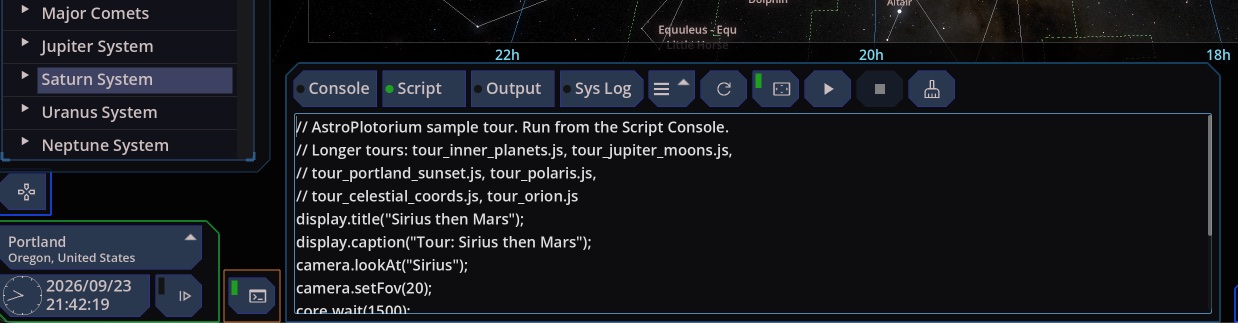
The script console runs small JavaScript programs that drive the same controls you use by hand: go to an object, set the field of view, change the clock, toggle a layer, switch the main view. You call a fixed set of commands on seven objects: camera, sky, time, observer, display, core, and console.
Open it from the script button at the bottom left, or with F12, Ctrl+J or Command+J, or the backtick key when you are not typing in a text box. Esc closes the console. The editor stays open when you change views, and the sky area shortens so the editor does not cover it.
The tabs
- Script. The program you edit and run.
- Console. One line at a time. Enter runs it. Up and Down walk back through lines you have typed in this session. A value such as
1 + 1prints2. Names you assign stay available on the next line until you run a script from the Script tab, or an assistant runs a script. - Output. Errors, load and run status,
core.output, and the lists fromcore.help,core.search,sky.listLayers, andcore.listOptionswhen those run from a script. - System Log. What the interface just did, written as script lines you can copy. Changing a layer, the magnitude limit, the clock, or the main view writes the matching command here. The list keeps growing while the console is closed. Copying a line from this tab is the easiest way to learn a name.
Clear does a different job on each tab. On Script it clears the caption on the sky and leaves your program alone. On Console it clears the transcript. On Output it clears the messages. On System Log it clears the trail.
Files
The file menu is on the Script tab. It shows the current name (untitled until you save), then New Script, Load, Save, and Save As.
Scripts live in your user folder, under scripts. Open user folder in the home menu shows that directory. Load and Save As start there and accept .js files from that folder.
Save writes the current file. If the script has never been saved, it asks for a name. Refresh, beside the file menu, reloads that file from disk. New Script clears the editor. If you have unsaved edits, it asks you to save, discard, or cancel.
The first time you open the console with an empty editor, it loads tour.js. That file is created if it is missing, and later updates leave it alone. The sample tours named tour_*.js are replaced when the app is updated, so copy one to a new name if you want to keep your edits.
Run and stop
Run plays the Script tab. It is unavailable while a script is already running. Each run starts clean: names from the previous run, and from the Console tab, are gone.
The checkbox beside Play starts that run in Presentation, so the toolbars are hidden and your captions stay. It applies only to this session and starts off. See Screenshots and presentation.
Stop cancels the run, including a pause that is waiting for you to click. While Presentation is on and a script is running, a cancel button at the bottom right stops the script and leaves Presentation.
core.exit() ends the script after the commands already issued. Lines after it are skipped. Stop cuts the run off immediately.
How commands run
Write the calls on successive lines. A turn, a zoom, a drag, and an animated time step finish before the next line runs. You do not insert a pause between camera.lookAt and camera.setFov unless you want the audience to wait.
camera.lookAt("Sirius");
camera.setFov(20);
core.wait(1500);
camera.lookAt("Mars");
core.wait and core.waitForUser are the pauses. The word await is rejected. core.wait can be up to two minutes.
observer.getLocation() and core.getState() read the picture as it is now, before later lines in the same script change it. Save the value first if you want to put it back:
const home = observer.getLocation();
observer.setLocation("Portland");
camera.lookAt("Saturn");
observer.setLocation(home);
A loop that calls camera.lookAt or time.addTime plays each step in order. Call core.exit() inside the loop to stop queueing more steps.
Names
camera.lookAt and core.search accept a common name (Sun, Mars, Moon, Sirius), a catalog id (MB-499, HYG-32349, CON-Ori, DSO-M-31), or a familiar label (M31, HIP 32349). If several objects share the name, the command fails and lists them. core.search("Portland") prints the candidates in Output, or in the Console transcript if you typed it at the prompt.
Angles
A plain number is degrees. You can also pass a string:
"5h 34m 32s"for hours, as in right ascension."5d 23m 28s"or"5 deg 23m"for degrees, minutes, and seconds."2d 3m"or"0h 30m"for a field of view.
camera.lookAtRaDec aims in the coordinate system already on screen. In ecliptic or galactic, the two numbers are that frame’s longitude and latitude. lookAtEquatorial, lookAtEcliptic, lookAtGalactic, and lookAtHorizontal aim in the named frame and leave the on-screen system as it is. Horizontal azimuth is clockwise from north.
Camera
| Call | What it does |
|---|---|
camera.lookAt("Saturn") |
Select that object and turn to it. Waits until the turn finishes. |
camera.lookAt(lng, lat) |
Aim at a longitude and latitude in the current frame. Two numbers, or angle strings. |
camera.lookAtRaDec(ra, dec) |
Same kind of aim, by the two coordinates of the current frame. |
camera.lookAtEquatorial(lng, lat) |
Equatorial right ascension and declination. |
camera.lookAtEcliptic(lng, lat) |
Ecliptic longitude and latitude. |
camera.lookAtGalactic(lng, lat) |
Galactic longitude and latitude. |
camera.lookAtHorizontal(az, alt) |
Azimuth and altitude for the current place and time. |
camera.setFov(2) |
Field of view. camera.zoom is the same call. Waits for the zoom. |
camera.rotate(angH, angV) |
Turn by a drag, in degrees. Positive angH matches a drag to the right. Positive angV matches a drag downward. Pitch stays within ±90°. |
camera.followTarget(true) |
Track in the celestial sphere and the planetarium. Turning it on slews to the target and waits. Turning it off leaves the view where it is. Outside those two views the flag is stored and the camera stays put. |
camera.followViewFrom(true) |
Camera follows Earth or the Sun in 3D Universe. Optional second argument: "Earth", "Sun", 399, or 10. Omit it to keep the current body. Turning it on waits. Outside 3D Universe the flag is stored and the camera stays put. An unknown body fails. |
camera.setOrbitAltitudeKm(400) |
Height above the globe in 3D Orbit, in kilometers. Allowed range 50 to 500000. |
camera.setOrbitIssTrack(true) |
A simplified circular ground track in 3D Orbit (51.6°, about 93 minutes). It is a teaching path, not a live station element set. |
camera.setOrbitFly(true) |
Unlock WASD flying in 3D Orbit, and leave hover and the station track. |
Sky
sky.setLayer("constellationLines", true) shows a layer. sky.showLayer(id) and sky.hideLayer(id) are the same with the visibility filled in. Matching ignores case, spaces, hyphens, and underscores. An unknown id fails. sky.listLayers() prints the names.
| Id | Layer |
|---|---|
stars |
Star catalog |
milkyWay, milkyWayDots |
Photographic band, and the dotted screen-tone |
starNames, bayer, hip, flamsteed |
Star labels |
messier, caldwell, majorDso, minorDso, dsoImages |
Deep-sky labels and pictures |
skyCulture |
Master switch for constellation and asterism figures |
constellationLines, constellationBoundaries, constellationNames, constellationImages |
Constellation figure |
asterismLines, asterismNames |
Asterism figure |
equatorialGrid, eclipticGrid, galacticGrid, azimuthalGrid |
Grids |
eclipticLine, gridRulers |
The ecliptic path, and the rim rulers |
atmosphere, land, horizonBand |
Sky glow, floor, horizon silhouette |
landSeeThrough, landByTime |
Ground transparency |
planetOrbits, dwarfPlanetOrbits, satelliteOrbits, asteroidOrbits, cometOrbits |
Orbit paths |
cometFx, planetNames, orbitLines, planetGrid |
Comet tails, names, orbit lines, planet grid |
magneticField, vanAllenBelt, bowShock, magnetopause |
Field drawings, when that body has them |
compareStars, comparePlanets |
Size comparisons |
allLabels |
Master switch for labels |
sky.setCoordinateSystem takes equatorial, ecliptic, galactic, or horizontal.
Constellation and asterism eyes are separate from those layers. sky.setConstellationVisible("Ori", false) hides Orion’s flag. You can pass an IAU id, CON-Ori, or the name. sky.showConstellation and sky.hideConstellation set the flag on or off. The call does not select the constellation, turn the camera, or switch the line and name layers. Turn skyCulture and constellationLines on yourself if the figure is missing. sky.setConstellationPreset takes all, none, or zodiac. sky.listConstellations() prints ids, names, and flags.
Asterisms use sky.setAsterismVisible, showAsterism, hideAsterism, and sky.listAsterisms(). The id can be the catalog id, AST- plus that id, or the name. sky.setAsterismPreset takes all or none.
Time
Units are case-sensitive: Y year, M month, D day, h hour, m minute, s second.
| Call | What it does |
|---|---|
time.setTime("2026-08-22T12:00:00Z") |
Jump to that UTC instant. A JavaScript Date is also accepted. The jump is instant. |
time.addTime("h", 1) |
Step from the current simulation time. The value is a whole number and may be negative. The step is animated and the script waits. |
time.addTime("D", 1, 0) |
The third argument is the animation length in milliseconds. 0 jumps. Omit it for a short glide. The longest glide is 30 seconds. A day or a year reads more clearly with a longer glide, such as time.addTime("D", 1, 20000). |
time.autoUpdateUnit("D") |
The unit used by Play and by the +1 / +10 buttons. |
time.play() |
Fast forward from the current simulation instant, in that unit. time.play(false) and time.stop() pause. This does not jump to the wall clock. |
time.resume() |
Snap to now, set the unit to seconds, and run in real time. |
time.reset() |
Snap to now. A clock that is already playing keeps playing. |
time.increment() |
Snap +1 of the current unit. Also decrement, increment10, and decrement10. |
See Time.
Place and main view
observer.setLocation("Portland") looks up a city. If several cities share the name, the command fails and lists country and region so you can pick again. You can also pass a latitude and longitude as two numbers, or as one coordinate string. A single number is treated as a city id.
observer.getLocation() returns the current place id, as a string. A session that was set with coordinates only returns "". Read it into a variable before you change the place if you want to restore it. User-saved places use an id that starts with u-.
observer.setLookFrom("Moon") matches Look from target. Optional latitude, longitude, and altitude in meters; omit them to keep the current site on that body. Returning to Earth with those omitted restores the last Earth place. An explicit latitude and longitude always win.
observer.setViewMode matches the Main View menu:
3D Universe, 3D Orbit, 2D Celestial Sphere, 2D Planetarium, 2D Solar System, 2D Planisphere, Simulation, Ephemeris.
suncentric and earthcentric open the 2D solar-system chart in that mode. Console opens this editor and leaves the picture as it is. A scene change waits for the camera.
observer.getLookFrom() returns the body, name, latitude, longitude, and altitude.
Text on the sky
Caption and title sit on the sky in every view, including Presentation. They show up when that line of the script runs.
| Call | What it does |
|---|---|
display.caption("Now Mars") |
Replace the bottom caption. Call it with no text to clear the caption only. |
display.print("line") |
Add a line under the caption. |
display.clear() |
Clear the caption. The title stays. |
display.title("Tour") |
Replace the title at the top right. Empty, or no argument, hides it. |
display.showNavigator(true) |
Left navigator. Showing it does nothing while Presentation is on. |
display.showPropertyList(true) |
Right property panel. |
display.showCharts(true) |
The secondary view, the polar chart, and the planisphere, together. |
display.setView("presentation") |
Chrome on the current picture: default, photoreal (the V key), or presentation (the P key). This is not a main-view change. In the solar-system chart and the planisphere, photoreal is Presentation. |
display.setSecondaryViewFov(20) |
Field of view of the secondary pane. Turns the side charts on if they were off. |
display.setSecondaryViewSync(true) |
Panning the main view also pans the secondary view and the chart centers. The secondary field of view stays its own. |
console.log("hello") always goes to the Console tab. core.output("hello") always goes to Output.
Options, snapshots, and pictures
core.setOption("starMagnitude", 6) sets a slider or a menu choice. It does not toggle a layer. core.listOptions() prints the ids and the allowed values. Matching ignores case, spaces, hyphens, and underscores.
| Id | Values |
|---|---|
starMagnitude |
1–12 |
starLabelMagnitude |
1–7 |
planetScale, satelliteScale |
1, 2, 5, 10, 20, 50, 100, 200, 1000, 2000, 3000 |
bortleScale |
0–9, with 0 the darkest |
starBrightness |
about 0.6–1.8 |
skyToneDensity, skyToneBrightness |
about 0.25–3 |
cometBrightness |
about 0.5–32 |
gridLineBrightness, constellationLineBrightness |
0–2 |
constellationImageBrightness |
0–3 |
lineBrightness |
0–2, and sets both grid and constellation line brightness |
autoRotate, clickSelectObject |
true or false |
theme |
default, red, white, antiquewhite, blueprint, gold, blackwhite, navywhite, blackgreen, blackblue |
planetImageModulate, view3DModulate |
true or false |
locale |
system, en, ja |
frameFocalLength |
24, 35, 50, 70, 100, 150, 200, 240, 300, 600, 1000, 1500, 2000, 2400, 2800 |
floorChoice |
savanna, ocean, none |
horizonChoice |
mountains, none |
landscapePreset |
land, ocean, none |
core.getState() returns the current view: field of view, aim, target, time, layers, constellation and asterism flags, options, main view, place, and the display switches. At the Console prompt the object is printed as text. From a script, pass it to core.output if you want it in the Output tab:
core.output(JSON.stringify(core.getState()));core.setState(obj) puts back the keys you include. A snapshot that only contains fov set to 20 changes the field of view and leaves everything else. It does not push a step onto Back / Forward.
core.screenshot() saves a PNG under screenshots in your user folder. The result tells you the path on this computer.
| Type | Picture |
|---|---|
default |
Labels and grids, without the side charts. This is the type when you omit it. |
photoview |
Labels and grids hidden. |
presentation |
Title, clock, script title, and captions. |
presentation_chart |
That, plus the side charts when they are on. |
A single filename is accepted: core.screenshot("tour.png").
core.help() prints the command list. core.search("Vega") prints name matches.
A short tour
display.title("Saturn, two views");
observer.setViewMode("2D Planetarium");
camera.lookAt("Saturn");
camera.setFov(2);
display.caption("Saturn, two degrees across the field.");
core.waitForUser("Next");
observer.setViewMode("3D Universe");
camera.lookAt("Saturn");
display.caption("The same planet, in the scaled system.");
core.waitForUser("Next");
display.clear();
display.title();
Run it with the Presentation checkbox if you want the toolbars hidden. Next sits at the bottom of the view until you click it. If you omit the label, the button still says Next.
Sample tours
Load these from the file menu.
| File | View | What it shows |
|---|---|---|
tour_inner_planets.js |
3D Universe | Sun, Mercury, Venus, Earth, Moon, Mars |
tour_jupiter_moons.js |
3D Universe | Jupiter, the Galilean moons, then an eight-day lapse |
tour_portland_sunset.js |
2D Planetarium | A Portland sunset, then Vega |
tour_polaris.js |
2D Planetarium | The sky turning around Polaris |
tour_celestial_coords.js |
2D Celestial Sphere | Equator and the north celestial pole, the ecliptic, the galactic center |
tour_orion.js |
2D Celestial Sphere | Orion, Betelgeuse, Rigel, M42, Sirius, M45 |
tour_eclipse_2026.js |
3D Universe, then 2D Planetarium | The 12 August 2026 total solar eclipse, then totality from Valencia. It waits for Next. |
What you can write
The language is ordinary JavaScript: let and const, functions, loops, Math, Date, JSON, and template strings. One file is the whole script. There is no import.
There is no fetch, no filesystem access, and no setTimeout. Use core.wait for a pause. time.setTime wants an ISO UTC string or a Date. A script that only calculates, and never waits on the camera or the clock, stops after about 30 seconds. Time spent waiting for a turn or for Next does not count toward that.
An assistant on this computer can call the same commands. See Controlling the app from an AI assistant.