
AstroPlotorium User Manual
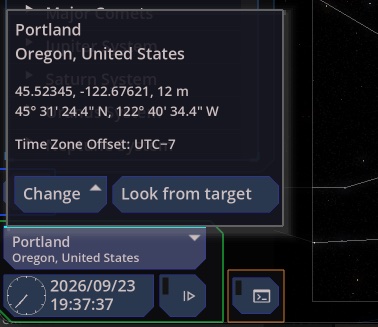
Your site on Earth
The location button shows the current place. Change searches cities or accepts coordinates. See Getting started for the paste formats and for saving a place.
Elevation is meters above sea level. It affects the local horizon slightly. A blank elevation is treated as 0.
A coordinate you paste without saving is kept for the session only. Choosing a city again stores that city as the observer.
Look from another body
Look from target uses the selected planet, moon, or the Sun as the place you are observing from. Your latitude and longitude stay as they are, now interpreted on that body. The location button then shows the body name and the coordinates.
Choosing an Earth city again returns you to Earth and restores the last Earth site. You can also aim the camera from the Sun or from Earth with the buttons under a solar-system target.
While you are looking from a body, that body is marked in the navigator and cannot be selected as a sky target. You are standing on it.
Sky views (planetarium, celestial sphere, ephemeris, planisphere, the solar-system chart, and 3D Orbit) use this observer. Altitude and azimuth, rise and set, and the planetarium ground all belong to that site.
Coordinate systems
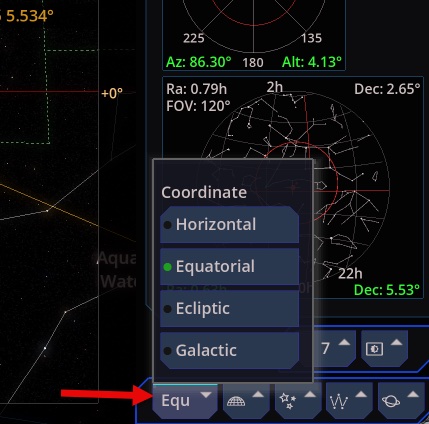
The menu at the bottom right sets the grid and the way you look around. It does not move the stars. It changes which numbers and which grid you are reading.
- Horizontal. Altitude and azimuth at your site, now. Azimuth runs from north (0°) through east (90°), south (180°), and west (270°). This is the planetarium’s natural frame. It changes when you change place or time.
- Equatorial. Right ascension and declination. Right ascension is often shown in hours (24 hours = 360°). This is the frame of star charts and most catalogs. It is fixed to the sky, so a star keeps its coordinates while the Earth turns.
- Ecliptic. Longitude and latitude along the plane of Earth’s orbit. The Sun, the Moon, and the planets stay near latitude 0°. Use this when you want to see the ecliptic path.
- Galactic. Longitude and latitude along the plane of the Milky Way. Use this when you are looking at the galaxy rather than at the seasons.
The edge rulers and the grid you toggle follow this choice. A target’s property list still shows equatorial coordinates, and apparent altitude and azimuth, so you can compare frames without switching back and forth.